Showing posts with label Apple. Show all posts

Sunday, September 30, 2012

Hasty and Superficial Rhythm


Turn your head in any direction and you’ll see half a dozen people pushing buttons on a smartphone, round a corner and bump into three others tense with passive-aggressive phone whining, while everyone else is walking and texting. Don’t let’s even look at what the adjacent drivers are doing with their phones. Meanwhile, up in the rarified air of executive boardrooms Apple is besieged by complaints about the new iPhone 5 at the same time that the Samsung Galaxy S111 gathers accolades and market share. And while these two companies taunt, bicker and sue over what is in the long run really only money, twentieth-century diarist, Anaïs Nin, who would not have known what a smartphone is mumbles in her grave.


“The secret of a full life is to live and relate to others as if they might not be there tomorrow, as if you might not be there tomorrow. ...This thought has made me more and more attentive to all encounters, meetings, introductions, which might contain the seed of depth that might be carelessly overlooked.
“This feeling has become a rarity, and rarer every day now that we have reached a hastier and more superficial rhythm, now that we believe we are in touch with a greater amount of people, more people, more countries. This is the illusion which might cheat us of being in touch deeply with the one breathing next to us. The dangerous time when mechanical voices, radios, telephones, take the place of human intimacies, and the concept of being in touch with millions brings a greater and greater poverty in intimacy and human vision.” — The Diary of Anais Nin, Vol. 4, May 1946

Sunday, October 16, 2011

Take a Message, Siri

Excitement running high on Saturday. Funny how a small gadget that fits in the palm of the hand has the juice to send a happy buzz whizzing up the arm and down through the toes. Until very recently there was a most uncommon man who was inarguably the best at generating this kind of excitement all around the world. The death of Steve Jobs saddened millions of people, and no one would wish to make light of his passing, but talk about leaving with a bang…Nine days later Apple releases the incredible iPhone 4S, sending the company stock soaring even higher and fans in seven countries swarming to buy one. You gotta think he’s looking down with a pleased smile.


So what about that iPhone 4S, the one that talks to you, works anywhere in the world, takes 8 megapixel photographs, syncs your mail, photos, music, calendars, contacts and bookmarks wirelessly with desktop, laptop and iPad? For about five years I’ve used an iPhone, an old Japanese iPhone 2, which for the last eighteen months has been unable to make calls, but has continued to send and receive email, run all the apps unrelated to calling and take excellent 3 megapixel photographs. Had my ups and downs with it, mostly when I was using it as a telephone and never quite felt the jolt of excitement experienced with other Apple products. That old phone, the one that took the photograph below is a clunky old Ford Pinto with rust spots compared to the iPhone 4S.


It’s no secret that for the past six months telephone trouble has been an almost daily headache with the unsmart, flip-top Sanyo clunker I’ve been carrying. The hardware, the chip, the magic, whatever was or wasn’t inside its dull case made it a semi-dependable device at best. Basic telephone calls have been an ongoing challenge with this giveaway phone from Sprint. With all that, it wouldn’t surprise anyone to hear that on Thursday I began thinking about an iPhone 4S. Long lines, people camping out in front of Apple Stores, reservations required, delivery promises; I figured that the day before its release was much like going to the party way late. Still, I drove over to Best Buy at noon on Thursday, made a reservation and paid a $50 deposit. The store rep said that I would be notified by email later in the day stating whether I could have the phone on Friday, or at most no later than the end of the month. It all depended on how many Sprint iPhones they would get late Thursday, and how many people were ahead of me. I figured the end of the month would be the earliest.


At 2:00 on Friday I got a call saying my Sprint iPhone 4S was ready for pick up.


Got the phone, along with a free invisibleSHIELD™ and a free set of earphones for hands-free talking, and by 3:00 was walking out of Best Buy telling the iPhone to call B. Oh, yeah, it follows spoken orders! Something called Siri. The worst part about the day was getting home with the new iPhone and short of time, having to put it in my pocket and join some friends for dinner. With every bite the thought uppermost in my mind was getting back home to snuggle up with the new phone and learn its magical secrets.


The photo above was taken with the old iPhone and the one below with the new iPhone 4S. Almost embarrassed to admit it, but the new phone has me doing something I’ve never done before—been sending text messages to friends, typing out stuff like ‘4S-2G2BT’—iPhone 4S, too good to be true.


Thursday, July 7, 2011

iPad Scribbling


In almost a month of using the iPad 2 it hasn’t yet proven to be the bonanza I read and hear about almost daily. The biggest worry prior to purchase is now taking on real shape with fears it might turn out to be nothing more than an expensive toy that requires feeding with regular tidbit apps from iTunes. Certainly numbers of enthusiasts will disagree, but productivity on the iPad is hard without laying out the money for a bunch of apps that will boost the device to its full potential. Out of the box it’s a cool-looking, whiz bang game console that does few of the things you see on iPad commercials. For that you’ll need a handful of outlays on your credit card.


The other day I noticed someone in Starbucks scribbling away on his iPad screen with a small black stylus. The words, or in his case math formulas were flying across the page just exactly as if he were writing on a piece of white paper with a pen or pencil. Perfect legibility, and as I looked on over his shoulder, he tapped an icon at the top of the screen and erased some numbers, tapped again and resumed his calculations. If I knew any math higher than Roman numerals I would have been able to read and understand every mark on the ‘page.’


I got the name of the app from the man and within five minutes pulled it up on iTunes. Three minutes after that I was scribbling lines on my own iPad. The program is called Noteshelf and comes from Fluid Touch for the reasonable price of $4.99. It is currently in version 3.0, is compatible with the iPad running iOS 3.2 or later. It is English and Japanese capable and has an average user rating of 4½ out of 5 stars.


Noteshelf has an incredibly rich set of features that make for easy writing and note taking in a wide range of places, situations and options. A few of my favorites:

• Choice of seventeen ink colors and line widths from fine to broad

• Templates of seventeen notebook styles; paper choices include blank, ruled (wide or thin), graph, music score, journal, day planner, task manager and more.

• Embed and annotate photos or other images with a couple of taps.

• Export options allow notes to be emailed or saved in Word or PDF files; printing is also possible.

• Apart from the eraser, Noteshelf offers unlimited undo/redo steps.

• Backup/restore function included.

• Easy to follow User’s Guide

• Wrist protection feature


Writing with the finger is easier than you might imagine and with a half hour’s practice the words begin to flow like fine ink in an expensive fountain pen. If you prefer, instead of your finger use a stylus. The Targus stylus works very well, though it costs four times the price of the Noteshelf app.


This type of app is not completely new. iShodo is a similar Japanese app for the iPhone, but then how much note taking is possible on a small iPhone screen? A couple of days getting used to the feel of Noteshelf and chances are good it will enhance productivity on your iPad.

Saturday, June 18, 2011

Growing Apples

Going back to 1990, the purchase of a just released Macintosh Classic computer began my long-running love affair with Apple products. Before that time computers in my experience were all ugly boxes with black screens of lime green text, possessing no characteristics or features that held any interest for me. A suitcase heavy black Sanyo word processor with an inside roll of paper for printing, and capable of producing English and Japanese served well enough. The Mac Classic though was a whole new ballgame and with its sidekick StyleWriter printer sent the word processor straight into hibernation.


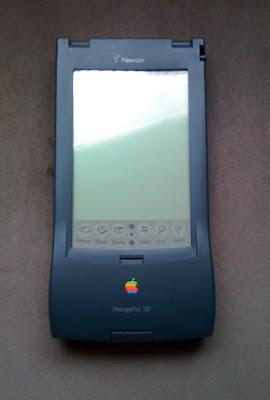
New Mac models were released, I upgraded to something a little bigger each time, and in 1994 got a Newton Message Pad 120, representing a whole new direction in personal data management. It was the first of the PDA devices, and while the core idea was sound, the hardware was clunky and the operating system full of holes. An earlier Scriblets post explained this device in more detail, but to shorten the story let’s just say the Newton didn’t live up to Apple expectations and by 1998 was history.

In 2007 Apple did the expected, carrying vastly improved Newton Message Pad technology into the design and operating system of the iPhone. That was quickly followed by the iPod Touch release, more of the same technology. Didn’t take me long to buy an iPhone when it was first released in Japan, and once again I was Apple-dazzled. The next big thrill came with the purchase of an iMac, a design that deserved all the awards that eventually came its way. Sleek, classy, smart and beautiful—Apple could do no wrong.


Then came April 2010 and the ultimate device, another one that owed it’s initial development to the old Newton. Enter the iPad. But for all the whiz-bang fireworks and glamour this one didn’t grab me, didn’t leave me with tongue hanging out. No sale. I chose to watch the iPad for a while, to wait and see what would happen in a year or so with a later model. From its unveiling and the press releases that followed, the iPad impressed more as a toy than a device that would increase, speed up or improve productivity. The first thought was that it had a “get more-spend more” idea built into it, a concept that would have users regularly feeding Apple and the App Store with a desire for more apps, more games, more ‘cool’ stuff. That notion left me resistant to the idea of owning an iPad.


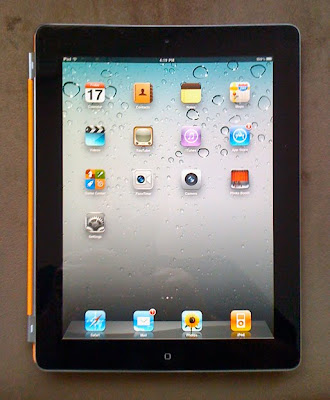
On March 2, 2011 Apple unveiled the iPad 2. After almost a year of looking, reading and thinking about the the iPad I was ready to take a hard look at the iPad 2 with an eye toward buying one if it impressed me as having usefulness above and beyond playing games, checking Facebook and watching YouTube. At the end of May I placed an order for the iPad 2.
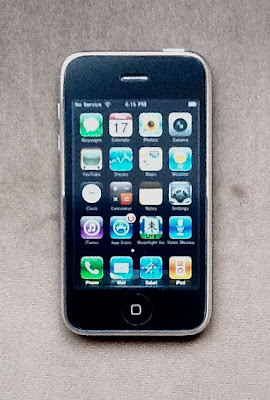

It arrived five days ago and slightly disappointed is the verdict. Compare the photos here of the iPhone and the old Newton Message Pad. The iPhone photo was taken with the iPad, the Newton photo with the iPhone. The camera on the iPad 2 isn’t even close to the iPhone camera. For me the biggest attraction on the iPad 2 was the email, offering a fourth option for checking, writing and sending email apart from the iPhone, laptop and iMac. Basically, the email works just fine; fast and dependable. I also like the way I can slant the iPad by folding the cover, making typing very easy on its large keyboard. Definitely a big plus. On the other hand, the spellcheck is clunky, there is no option for bold, italic or underlined type in email—or if there is, I have not found it in five days of searching. There is also no option for colorizing text, sometimes a useful function. Most troublesome was having to input all my contacts manually, since syncing the iPad with the iMac skipped the address book. Is that really supposed to happen? What does sync mean, if not copying and aligning data on two separate devices?


Using Safari on the iPad is also less than smooth. Here there is a good possibility that I will come to understand it all better in time and find moving between websites easier. With Safari the iPad doesn’t impress me as being as intuitive as what I’ve come to expect from Apple. The hope is that more practice and experience will open a few doors, reveal a few shortcuts.

The iBooks app and the downloaded books are beautiful, much more so than eBooks on the Kindle, and I do like most of the features, but miss the dictionary that is a part of the Kindle. I also miss the lightness of the Amazon eReader. The iPad 2 is a whopping 1.33 lbs (608 grams) and feels like reading text off a brick. The Kindle is also clear and easy to read in bright sunshine, a quality missing in the iPad. The search text feature is good, the page numbering much better than Kindle, a choice of fonts and sizes is available and the brightness of the page is adjustable, but there is no one-tap dictionary like that in the Kindle.


Am I sorry that I bought the iPad 2? Mmm…probably not. I depend upon Apple’s superior technology to either show me the way or to fix the clumsy bits in future iOS system upgrades. Meanwhile, I will give the new iPad a run for the money and hope that Apple is not holding its breath waiting for me to begin purchasing apps in their humongous profit generating App Store.

Tuesday, July 13, 2010

Hangin’ Out at the Mall

Driving west on I-4 for a little over an hour takes me to a giant shopping mall called Mall of the Millennia. Like most malls, this one too has what seems like a hundred stores on two levels, including three department stores (Bloomingdale’s, Macy’s and Neiman-Marcus), an Apple Store, Montblanc, the best of all hamburger restaurants, valet parking, and a million people. Visitors from Japan love this kind of thing, so we made a day of it this Monday.


Kumiko and Ikuko arrived at the mall with stars in their eyes, comfortable walking shoes on their feet and a stack of credit cards in hand. One minute inside the main entrance and there was a gasp on either side of me as the Ann Taylor store came into view. I didn’t need words to understand that it was time for me to leave them to it, while I went off to Apple and Montblanc. We agreed to meet later for lunch at Johnny Rockets.


The Apple Store at Millennia is design-wise nothing special, little more than a big rectangle with hardware on tables, and software, along with accessories on racks along the back half of the store; Genius Bar at the far end. It’s nowhere near as cool as the Manhattan glass cube store, or either of the two Tokyo stores, one of which features a glass spiral staircase leading to the upper floors, and the Ginza store which occupies its own multi-storied building. On visits to an Apple Store anywhere chances are you will find it crowded, but now with release of the iPad and the iPhone 4, you almost have to wait in line to get inside. To meet the surge of curious browser-buyers, Apple has increased the number of store personnel greatly. There were at least thirty blue-shirted employees in the Millennia store today, but unlike earlier days, not all of them are Mac professionals. They are all friendly and quick to help, but I talked at length with four of them today, and two impressed me as still learning the Mac architecture. No complaint intended. Mac professional or not, they are still good sales people and managed to separate me from almost $200.


Entering the Montblanc store, I crossed over the gates of heaven. It is the ONLY place within a hundred miles or more where I can handle and sample fountain pens and ink, and you can be certain I did that today. First on my mind was ink, and I had a deep down hope that the Millennia store would somehow have an unsold bottle of either Racing Green or Turquoise. But I got a quick no on that request. Still, there were unfamiliar colors for me to sample. Surprising to see that the bottles, boxes and color names are different from what you find in Japan. For example, what in Japan is called Deep Violet is called Lavender Violet here. The bottle in Japan holds 50ml, while the bottles I sampled today hold 60ml. The familiar rounded end opposite the cap is not rounded but square. It looks more old-fashioned, and that I like.


After playing around with half a dozen fountain pens and several colors of ink, I settled on an elegant, aristocratic-looking gray ink named Oyster Grey, and a twin to Montblanc’s Sepia, here called Toffee Brown. For reasons I haven’t figured out, the company is using different ink names here and in Japan. Samples of the Oyster Grey and Toffee Brown will be upcoming in a later post.


Johnny Rockets retro 50s hamburger restaurants are located in sixteen or seventeen countries, and thirty-one states in the US. For a long time it has been my favorite place for hamburgers, and since it is not in Japan, I wanted to introduce rocket burgers to my guests. The whole experience is a throwback to the kind of hamburger shops that were popular in the 1950s, and the burgers, though now offered in combinations wider than the lettuce, tomato & pickle hamburgers of long ago, have that great flavor I remember from high school, nights at Hoppers and curb service. Strange as it seems, we had a waiter today who grew up in Japan, so amidst all that 1950s Americana we ordered our lunch in Japanese.


After lunch we separated again and when next we came together I could hardly find the two ladies behind all the shopping bags. And so, with the trunk filled, we joined the late afternoon traffic on I-4 heading east.

Wednesday, February 3, 2010

Technology: Battles & Bait

Consider for a moment Associated Press technology writer, Peter Svensson’s analogy of having to buy a new set of CDs every time you buy a stereo system.


For all my faithfulness and consumer support for Steve Jobs and Apple, I sometimes fear he and his company are leading us to just such a crippling state of affairs. The soon to be released (and totally awesome!) iPad is an example in point. Lurking beneath the sleek ‘cool’ and handheld power of this new device is a recipe for even greater technological addiction, one which includes increased consumer spending, and a battle of alternate operating systems.


But make no mistake about my own two-sided position in this issue. Since the 1990 Macintosh Classic computer I have owned a least a baker’s dozen Apple computers, a Newton, more than a few iPods and the now the iconic iPhone. I have all but worshipped at the altar of Apple technology from the very beginning, but in recent years have had to admit to some fading of the rose. I now see questions where once I jumped with complete trust at everything coming out of their warehouse doors.


Two examples may illustrate my disillusion. Many users, including myself, look forward to, and quickly buy system upgrades from Apple. How rare is it to discover that the latest upgrade frequently makes one or two installed applications obsolete? Nothing for it but to shell out for application upgrades. That may be small beer when the software application is an inexpensive one, but another altogether when it’s one with an upgrade costing hundreds of dollars. My experience on two occasions. (I’m still getting over the Snow Leopard OS upgrade.) Then there is the fabulous iPhone, which becomes not so fabulous when you travel abroad, or move to another country. In such cases the iPhone becomes a basically useless toy. Without paying overseas rates there is no phone, no email, texting, YouTube, Apps Store, navigational maps, or anything Internet connected. A Tokyo acquaintance recently spent a month in Australia, where he used his iPhone as freely as he does at home in Japan. He later received a bill in the thousands. Pleading ignorance of the system fell on deaf ears. Unless you’re rich as Croesus, outside of home ground your iPhone becomes a glorified iPod.


The dazzling new iPad now threatens to ignite an e-reader systems battle between Apple, Amazon’s Kindle, the Sony e-reader, and the Barnes & Noble Nook. All but Apple and Amazon (including libraries) use an Adobe system for their e-readers. Apple is nearly infamous for its reluctance to collaborate, and Amazon claims the leader’s position. So where does that leave me if I want to transfer my Kindle books to an iPad? In the end it will surely leave me spending more money for something that should have been designed to include an element of collaborative spirit.


I doubt that Steve Jobs would lose much sleep in learning that the iPad is not on this follower’s shopping list. Sort of leaves one to wonder about the Orwell-Huxley dilemma wherein we are killed by the things we fear, or on the other hand by the things we love.

About Me

My photo
Oak Hill, Florida, United States
A longtime expat relearning the footwork of life in America